Refusing Vulnerable Images
Overview
The Workloads and Registries pages only present vulnerabilities. To keep an image with too many of them from being deployed, use three rule types of the Admission Policy page, all of which go by K8s Sentinel's own scan results:
| Rule type | Version | What it does |
|---|---|---|
| Vulnerability Limit | v0.66+ | Refuses images with more Critical or High vulnerabilities than allowed |
| Blocked CVEs | v0.68+ | Refuses images that have any of the vulnerabilities named, whatever their severity |
| Scanned Images | v0.70+ | Refuses images K8s Sentinel has no scan result for |
They are made, bound and removed like any other admission policy: the policy holds the condition, the binding holds the scope and the action (Deny or Warn).
v0.65.0 had a separate Deployment Gate page under Vulnerabilities. It was removed in v0.66.0 in favour of the rule types above. The policy that page made is removed on upgrade; make it again under Admission Policy.
Vulnerability Limit
Under Policies → Admission Policy, click + New Policy and choose Vulnerability Limit as the Rule Type.
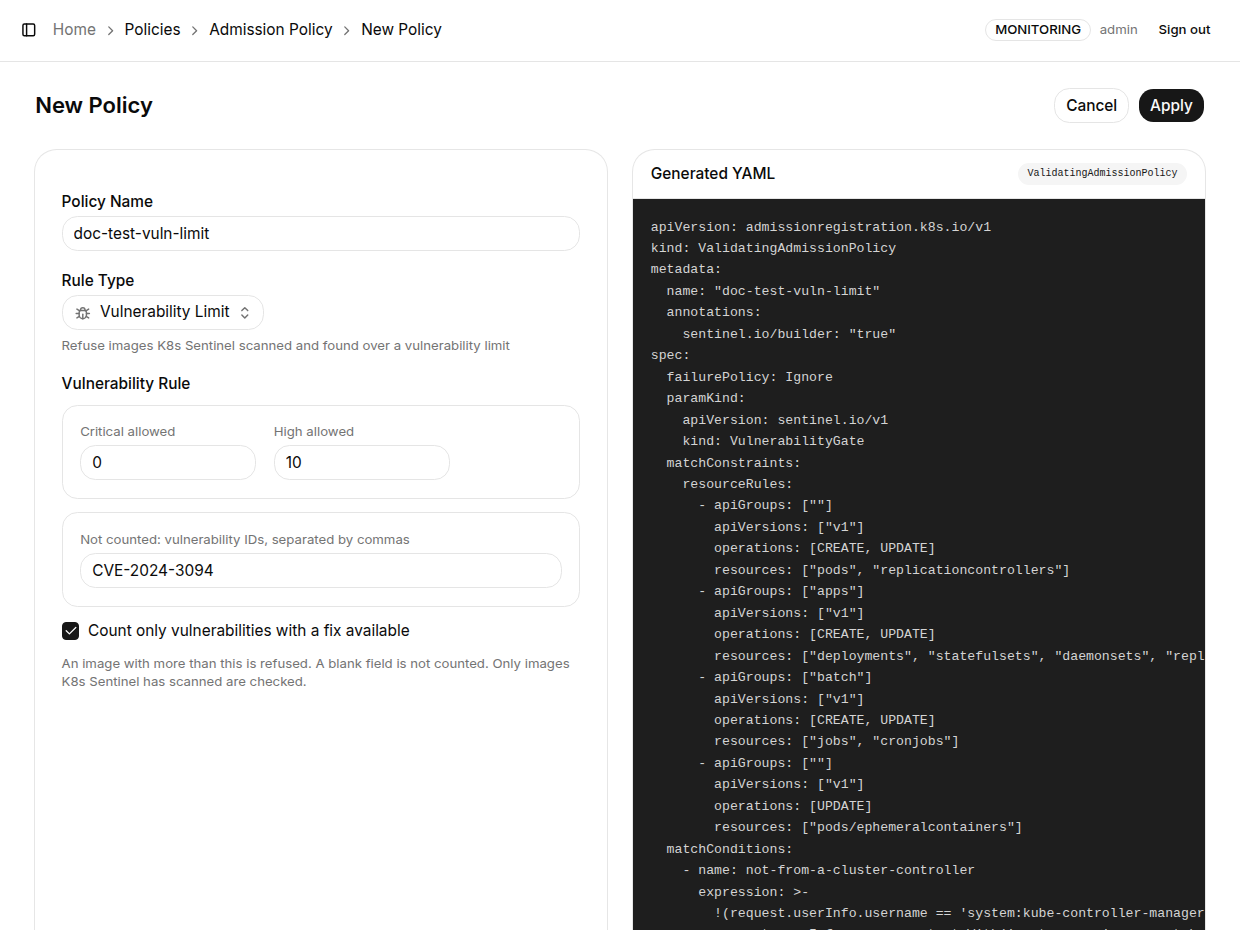
| Field | Description |
|---|---|
| Critical allowed | How many Critical vulnerabilities an image may have; more is refused. A blank field is not counted |
| High allowed | How many High vulnerabilities an image may have. A blank field is not counted |
| Not counted (v0.70+) | Vulnerability IDs the limit leaves out, separated by commas: the ones you have looked at and found not to matter to you. An image is judged by what remains, and the refusal message gives the counts without them |
| Count only vulnerabilities with a fix available (v0.67+) | Counts only the vulnerabilities a newer version fixes, leaving out the ones nobody can do anything about yet. An image that is refused is then one an upgrade would let through |
Further notes:
- Several policies may set different limits for different namespaces
- The Not counted list belongs to the policy, so two policies may leave out different ones. It is kept in the cluster with the policy, not in K8s Sentinel
- A vulnerability the scan counted three times, once for each package that has it, is taken off three times
Blocked CVEs
Choose Blocked CVEs as the Rule Type and enter the IDs (CVE-2024-3094, for example) under Vulnerability IDs, separated by commas. An image that has any of them is refused whatever the severity, for the day a vulnerability is serious enough to stop by name.
- IDs are compared as scanners write them; the form puts a
cve-orghsa-prefix typed in lower case right - K8s Sentinel looks the IDs up in its scan results when the policy is saved and keeps them current
Scanned Images
Vulnerability Limit and Blocked CVEs can only refuse images that have been scanned; an image with no scan result is admitted. The Scanned Images rule closes that gap: bound to a namespace, it refuses every image there that K8s Sentinel has no scan result for, clean or not. The rule has no other settings.
A workload report only exists once an image is running, so an image new to the cluster has to be scanned under Registries before it can pass this rule.
- The rule refuses nothing until K8s Sentinel has listed every scanned image for it, which it does within seconds of the policy being saved on the Admission Policy page
- If there are more scanned images than the list can hold, the rule admits everything again, with a line in K8s Sentinel's log
Creating the Binding
A policy does nothing until it is bound. On the Bindings tab, create a binding that chooses the namespaces and the action:
| Action | Effect |
|---|---|
| Deny | Refuses the workload, with the image and its counts in the message |
| Warn | Admits it and returns a warning |
When a policy of one of these three rule types is selected, the binding form adds the paramRef by itself, passing the scan-result object K8s Sentinel maintains, sentinel-vulnerability-gate, to the policy. Nothing has to be set by hand.
Start with Warn, watch what it would affect, then switch to Deny.
What Is Checked
| Item | Description |
|---|---|
| Checked | A workload being created or changed (Deployment, StatefulSet, DaemonSet, ReplicaSet, ReplicationController, Job, CronJob), a pod created on its own, and a container added with kubectl debug. Changing a workload's spec is checked, which includes a kubectl rollout restart |
| Not checked | What the cluster's own controllers create for a workload already admitted. A node restart or a reschedule therefore brings back what was running, even if its image has gone over the limit since. Scaling, labelling and deleting are not checked either |
| How a controller is recognised | By the account making the request (kube-controller-manager, a service account in kube-system, a kubelet), not by the object naming an owner, which anyone can write (fixed in v0.69) |
| Namespaces never refused | kube-system and K8s Sentinel's own namespace, whatever the binding says, so the cluster's components and the scanner itself are not held back |
| The same image under another name | nginx, nginx:latest and docker.io/library/nginx:latest are one image. A tag and a digest of the same image are not matched to each other, so a scan of app:v1 does not stop app@sha256:... |
The counts come from the two places K8s Sentinel has them: the workload reports (Trivy Operator) and the registry scans. An image neither has seen is admitted. To have images checked before their first deployment, add their registry under Registries, or combine with the Scanned Images rule.
How It Works
A ValidatingAdmissionPolicy cannot look anything up while it decides. K8s Sentinel therefore keeps the counts for every scanned image in an object of its own kind: a VulnerabilityGate named sentinel-vulnerability-gate. The binding passes that object to the policy as its parameter.
| Situation | Behaviour |
|---|---|
| A registry scan finishes an image, or a policy is saved on the Admission Policy page | The object is updated within seconds |
| A workload report changes | Updated within two minutes |
| K8s Sentinel is down | The policy goes on working from the last counts |
| The object is removed | The policy admits everything |
| Scan results cannot be read for a while | The object stays as it was instead of being emptied (v0.69+) |
K8s Sentinel writes this object and nothing else: the policy and the binding stay as you made them.
A refusal is returned to whoever applied the workload. It reaches Admission Events only where the API server audit webhook is set up.
Requirements and Upgrading
The VulnerabilityGate kind is defined in deploy/sentinel.yaml. When upgrading from an earlier version, re-apply deploy/sentinel.yaml, then restart K8s Sentinel:
kubectl apply -f deploy/sentinel.yaml
kubectl -n sentinel-system rollout restart deployment/sentinel
| Upgrading to | Without re-applying |
|---|---|
| v0.66.0 | A Vulnerability Limit policy cannot be created |
| v0.67.0 | A policy set to count only fixable vulnerabilities admits everything. Registries scanned before the upgrade have no fixable counts until their next scan |
| v0.68.0 | A Blocked CVEs policy admits everything |
| v0.70.0 | A Scanned Images policy admits everything, and the Not counted list of a Vulnerability Limit has no effect |
When that happens, K8s Sentinel's log says the kind is older than it. From v0.70.0 the kind keeps fields it does not know, so later versions will not need this step for it.
Re-applying deploy/sentinel.yaml puts the Deployment and the Service back to what the file says; see the upgrade notes in the Installation Overview.
What Happens on Uninstall
When uninstalling with uninstall.sh and without --purge, other admission policies stay and go on being enforced, but Vulnerability Limit and Blocked CVEs policies admit everything from then on, because the scan results they go by are removed. See Uninstall.