Workload Vulnerabilities (Workloads)
Overview
The "Vulnerabilities → Workloads" page (since v0.60) lists every running workload in the cluster together with the known vulnerabilities (CVEs) in its images.
K8s Sentinel does not scan these images itself. Trivy Operator does the scanning, and K8s Sentinel reads the VulnerabilityReport resources it writes. Trivy Operator is an optional component; see Installing Trivy Operator for how to install it.
This page only presents and orders results and does not block deployments by itself; to refuse images with too many vulnerabilities by these results, see Refusing Vulnerable Images. For images that are not deployed yet and still sit in a registry, see Registry Scanning.
Ordering and Reading the List
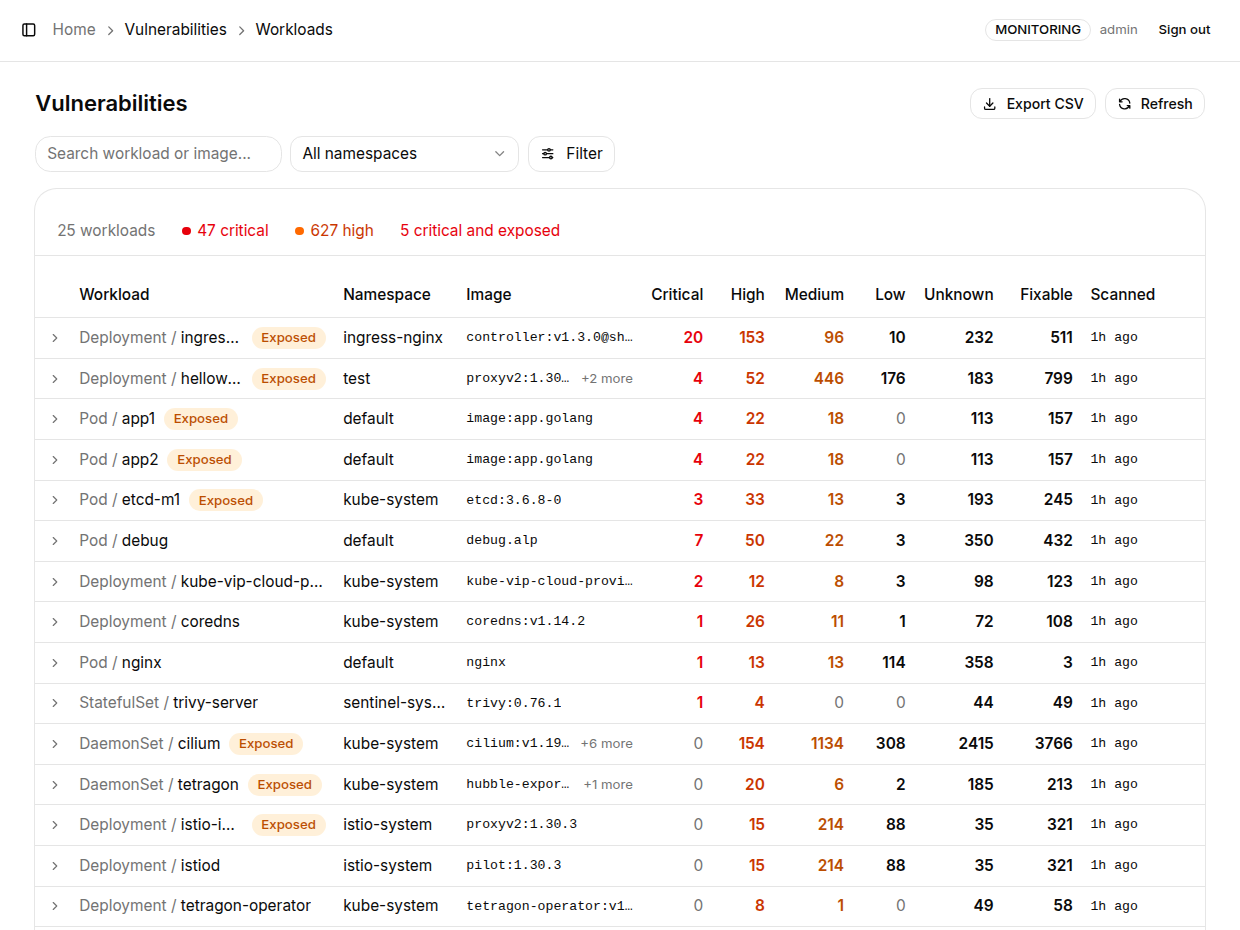
The summary line above the list shows the number of workloads, the Critical and High totals, and the number of workloads that are "critical and exposed". When a workload has several images, the Image column shows the first one with "+N more".
The list columns are Workload, Namespace, Image, Critical, High, Medium, Low, Unknown, Fixable and Scanned.
| Behavior | Description |
|---|---|
| Ordered by what to fix first | A workload that has a Critical finding and is also reachable from outside the cluster comes first, then by Critical and High counts. "Reachable from outside" uses the same exposure detection as Network Topology, so the Exposed badge here and the exposure mark on the topology graph always agree |
| One row per workload | Trivy Operator files reports under the active ReplicaSet; K8s Sentinel rolls them up to the Deployment (the object you would actually edit). A CronJob's running Pods are listed under the CronJob |
| Not scanned is not clean | The list is built from the running Pods, so a workload with no report appears as Not scanned with "-" for counts, never as 0. A workload where only some images have a report is marked partial |
| stale | The scan result is more than 7 days old. Trivy Operator rescans on its own schedule, and an old report says nothing about CVEs published since |
| Fixable | The number of findings that name a fixed version, that is, the ones an image upgrade removes |
Trivy Operator scans a workload's Pod template. If the template has been updated but Pods of the old image are still running, the old image stays unscanned.
Containers Without a Report of Their Own
Since v0.62, a container without a report of its own uses a report of the same image, because what a scan finds belongs to the image itself, wherever it runs. This covers two cases:
- Several containers in one workload share the same image (for example the Cilium agent), where the operator sometimes completes only some of the scans
- A sidecar injected at admission (for example a service mesh proxy), which is not in the template the operator scans, but whose image has usually been scanned where it is declared
The image has to be the same: same repository and tag (or digest); when the report is taken from another workload, the registry must be the same too. A sidecar image that nothing else in the cluster declares stays partial.
Filtering, Expanding and Exporting
| Element | Description |
|---|---|
| Search workload or image... | Search by workload name or image |
| Namespace filter | Several namespaces can be selected at once |
| Filter → Severity | Critical / High / Medium / Low / Unknown |
| Filter → Show only | Exposed, Fix available, Not fully scanned; the flags can be combined, for example Exposed plus Fix available is a to-do list |
| Refresh | Re-read the cluster immediately |
| Export CSV | Export what is currently on screen, one line per image |
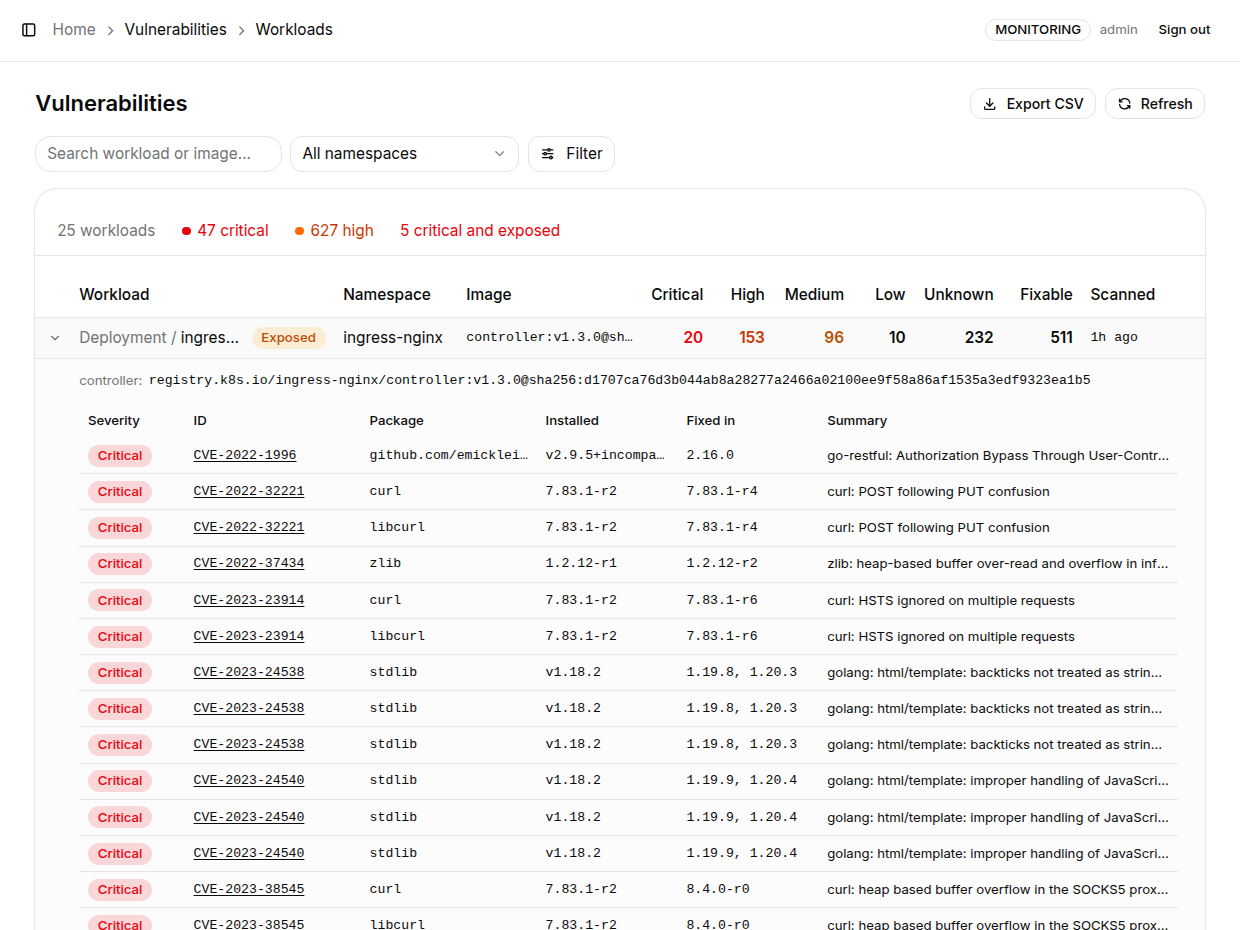
Expand any row to see each image's own counts and the finding details, with the columns Severity, ID (the CVE ID, linking to its advisory), Package, Installed, Fixed in and Summary (plus a Container column when the workload has several images). Findings are ordered from the highest severity down, and within a severity the ones with a fixed version come first; 50 are shown by default, and clicking "Show all N findings" shows all of them.
If a report cannot be read at the moment you expand the row (Trivy Operator rewrites the report on every rescan), the row says so explicitly instead of showing no findings; click Refresh to retry.
When the Data Updates
- The workload list is cached for 1 minute and the scan report summaries for 5 minutes (v0.61+). A scan that has just finished can therefore take up to 5 minutes to appear; click Refresh to read it immediately
- Init containers are included; finished Pods (completed Jobs) and Trivy Operator's own scan Jobs are not listed
When the Page Has No Data
The page says why directly:
| Page message | Cause and fix |
|---|---|
Trivy Operator was not found in this cluster. | Trivy Operator is not installed yet, see Installing Trivy Operator |
Sentinel is not permitted to read vulnerability reports. | The ClusterRole lacks the rule to read reports. An upgrade from an earlier version needs deploy/sentinel.yaml re-applied |
Vulnerability reports could not be read. | An error occurred while reading the reports; the reason is shown below the message |
The Same Results on Other Pages
Since v0.61, the vulnerability scan results also appear in three places:
| Page | How it is shown |
|---|---|
| Network Topology | When a Pod's own images have Critical findings, a red bug icon appears in the top-left corner of its node; the detail panel shows the count, and notes it specifically when the Pod is also reachable from outside the cluster |
| Dashboard | The Vulnerabilities card: Critical and High totals, the number of workloads that are both Critical and externally exposed, the number of workloads not fully scanned, and the 5 workloads to fix first |
| Event Sources | Lists Trivy Operator as a source, showing its status, the number of reports and the time of the newest report |