TracingPolicy Management
About This Page
TracingPolicy is a Custom Resource Definition (CRD) defined by Cilium/Tetragon that describes security rules to apply to Pods. K8s Sentinel provides full lifecycle management for TracingPolicies, supporting two scopes:
- Cluster-scoped: Applies to all Pods across the entire cluster
- Namespace-scoped (TracingPolicyNamespaced): Applies only to Pods within a specified Namespace
Viewing the Policy List
Navigate to the "TracingPolicy" page to see all created Policies listed in a table.
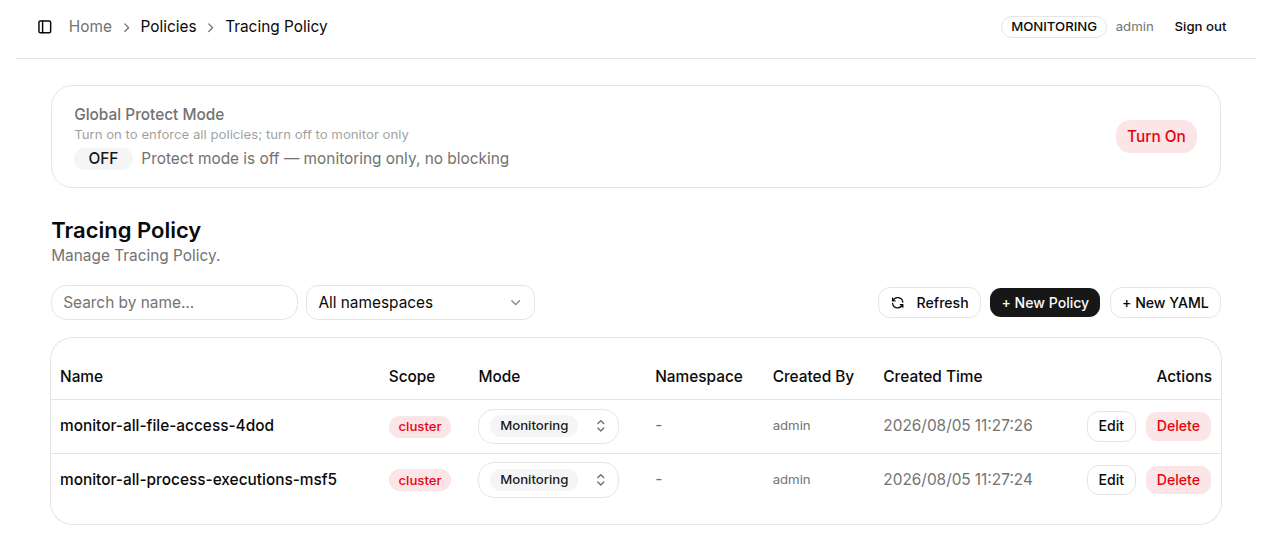
Toolbar:
| Element | Description |
|---|---|
| Search by name... | Enter a keyword to instantly filter policies by name |
| All namespaces | Filter by Namespace (only applies to Namespace-scoped policies) |
| Refresh | Re-query the latest policy list |
| + New Policy / + New YAML | Create a new policy with the form editor or the YAML editor |
Table columns:
| Column | Description |
|---|---|
| Name | The resource name of the TracingPolicy |
| Scope | Scope: cluster (cluster-level) or namespaced (Namespace-level) |
| Mode | Execution mode dropdown - click to switch between Monitoring and Protect directly in the list |
| Namespace | The Namespace a Namespace-scoped Policy belongs to; blank for Cluster-scoped |
| Created By | The user account that created this Policy; policies created with kubectl apply show k8s-apply |
| Created Time | The creation timestamp of the Policy |
| Actions | Available operations: Edit or Delete the Policy |
- Policies created in K8s Sentinel: open in the form editor when the form can represent them, otherwise in the YAML editor
- Policies applied with
kubectl(Created By isk8s-apply): always open directly in the YAML editor, showing the YAML as its author wrote it - a save from the form would rewrite field order, quoting and comments, leaving the file in git no longer matching the cluster
Creating a New Policy
K8s Sentinel offers two ways to create a policy:
- "+ New Policy": the graphical form editor, with the rules on the left and a live Generated YAML preview on the right (see Form Editor)
- "+ New YAML": a full-screen YAML editor for writing a complete TracingPolicy manifest (see YAML Editor)
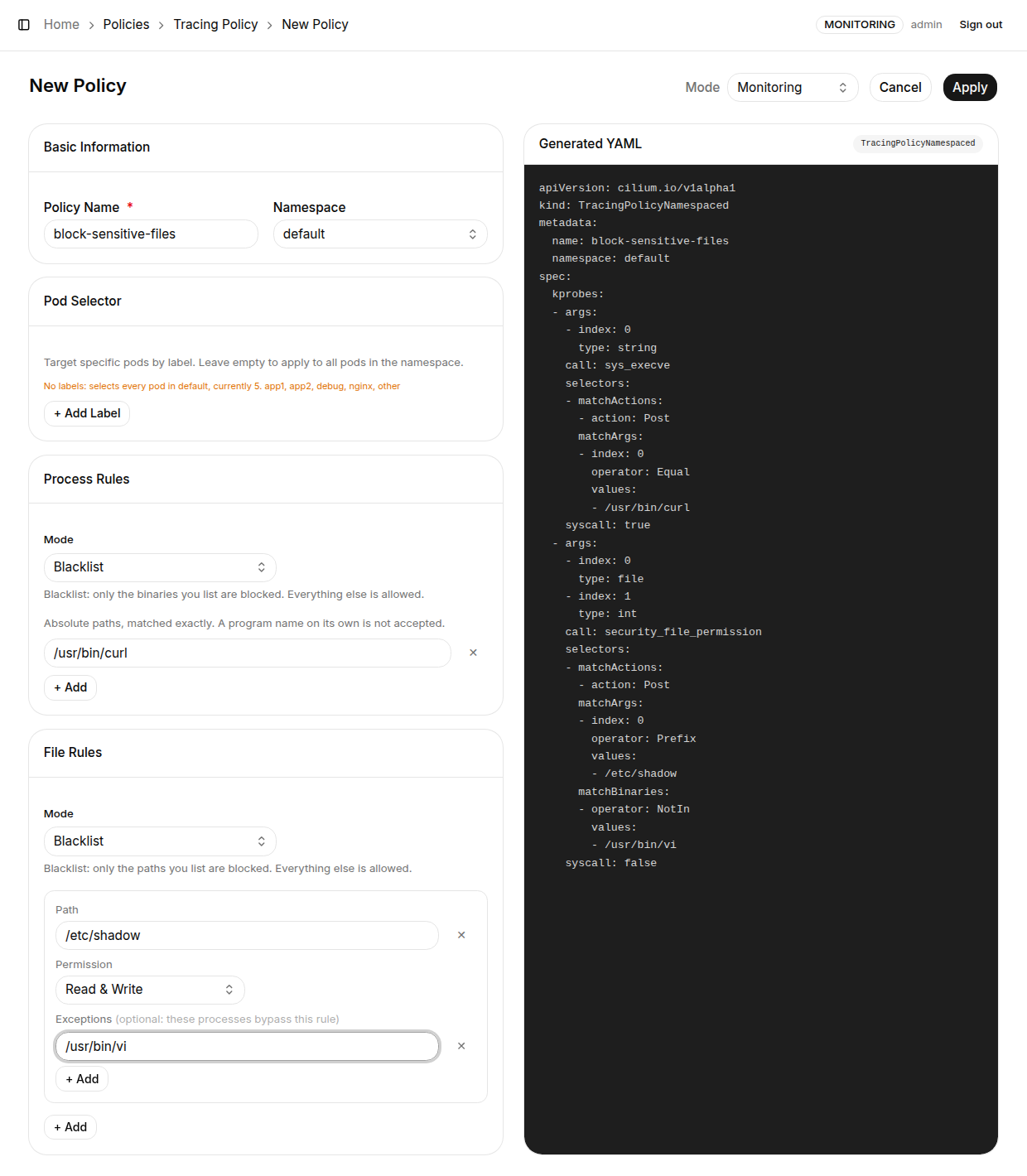
Common settings:
- Policy Name (required): Resource name of the TracingPolicy; must follow Kubernetes naming conventions (lowercase letters, numbers, and hyphens)
- Namespace: Select the target Namespace to create a
TracingPolicyNamespaced, or choose cluster-wide to create a cluster-scopedTracingPolicy - Mode (top-right dropdown): Select the initial execution mode;
Monitoringmode is recommended for initial deployment so you can observe behavior before switching toProtect
Click "Apply" when done.
How it works: K8s Sentinel automatically generates the corresponding TracingPolicy or TracingPolicyNamespaced YAML from the form data and creates the resource in the cluster via the Kubernetes API Server. The Tetragon Agent applies the new policy within seconds.
- Creating a policy under a name that already exists is refused instead of replacing the existing policy
- A policy the form cannot fully represent opens in the YAML editor, so no field is lost on save
Toggle Global Protect Mode
The top of the TracingPolicy page contains a Global Protect Mode banner that lets you switch the execution mode of all Policies in the cluster at once.

| State | Banner Text | Effect |
|---|---|---|
| OFF (default) | "Protect mode is off - monitoring only, no blocking" | All Policies record events only; no blocking |
| ON | "Protect mode is on - all policies are enforcing" | All Policies simultaneously switch to Protect mode |
Click "Turn On" - K8s Sentinel batch-updates the mode field of all TracingPolicies to Protect. The Tetragon Agent takes effect immediately.
Click "Turn Off" - K8s Sentinel batch-reverts all Policy mode fields to Monitoring, restoring record-only mode.
Before enabling Global Protect Mode, make sure all TracingPolicies have been thoroughly validated. If a Whitelist is missing required executable paths, switching to Protect mode may block legitimate services. Switch Policies one by one first to confirm no issues before using the global switch.