Network Policy
Overview
The Network Policy page provides visual management of Cilium Network Policies. You can define Ingress and Egress network access rules between Pods through a graphical form - no hand-written YAML required. K8s Sentinel automatically generates the corresponding CiliumNetworkPolicy resource from the form and applies it to the cluster.
As of this version, Pod-level network access control is handled by Cilium Network Policy (the Network Rules section has been removed from the TracingPolicy form): TracingPolicy focuses on process- and file-level security, while network-level allow/deny rules are managed here.
Viewing the Policy List
Open "Policies → Network Policy" to see all existing Network Policies in a table.
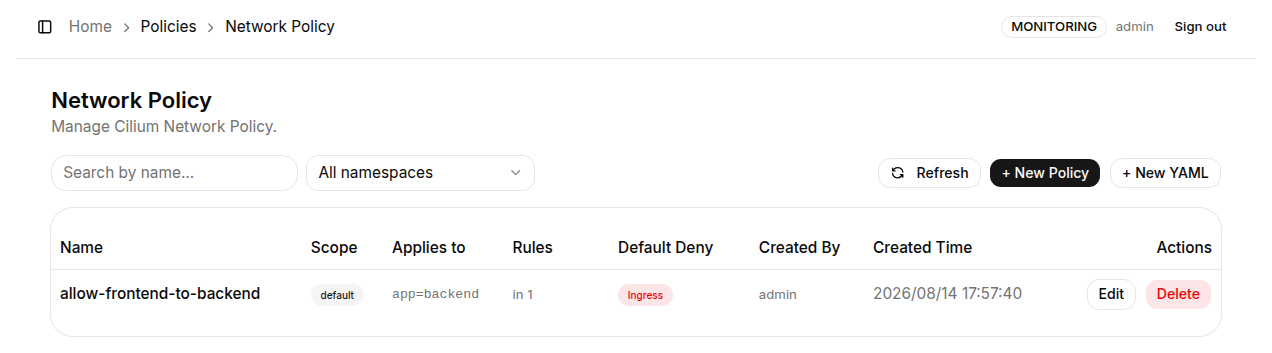
Table columns:
| Column | Description |
|---|---|
| Name | Resource name of the CiliumNetworkPolicy |
| Scope | Shows the namespace for namespaced policies; cluster for cluster-wide policies |
| Applies to | The Pod label selector this policy governs (e.g. app=backend) |
| Rules | Rule count summary: in N for N ingress rules, out N for N egress rules |
| Default Deny | The direction(s) where this policy causes a default deny (Ingress / Egress); in Whitelist mode, traffic not listed in any rule is rejected |
| Created By | The user account that created this policy |
| Created Time | Full creation timestamp |
| Actions | Edit (open the edit page) and Delete (with a confirmation dialog) |
The toolbar at the top provides a "Search by name..." box and an "All namespaces" filter.
Creating a Policy (Form)
Click "+ New Policy" to open the graphical builder - the form is on the left, with a live Generated YAML preview on the right.
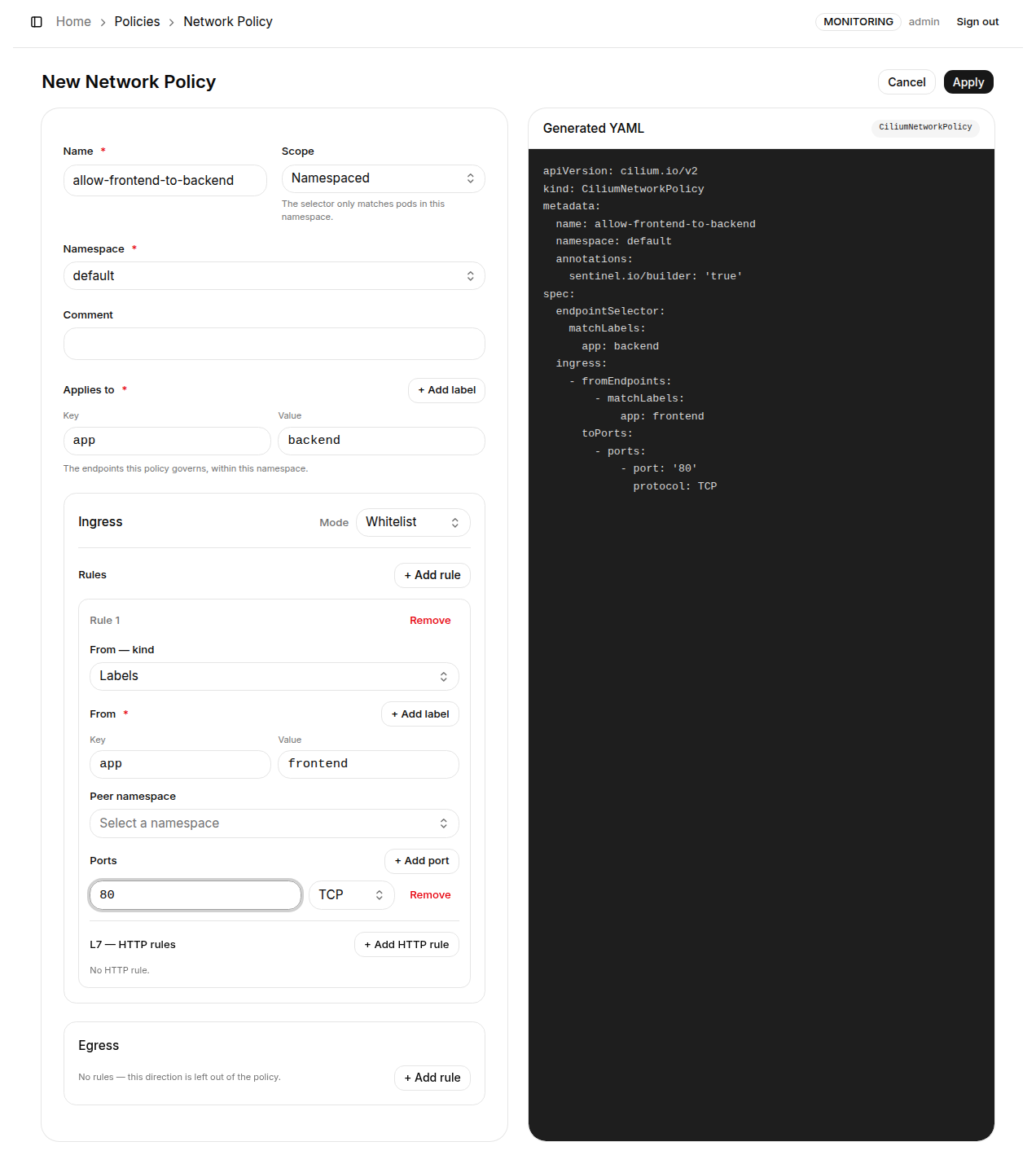
Basic fields
| Field | Required | Description |
|---|---|---|
| Name | ✅ | Policy resource name, must follow Kubernetes naming rules |
| Scope | ✅ | Namespaced (the selector only matches pods in that namespace, generates CiliumNetworkPolicy) or Cluster-wide (generates CiliumClusterwideNetworkPolicy) |
| Namespace | Required when namespaced | The namespace the policy belongs to |
| Comment | - | Free-form note to help your team understand the policy's purpose |
| Applies to | ✅ | key=value labels selecting the target Pods this policy governs (endpointSelector); at least one label is required |
While editing Applies to, the form shows which pods the selector matches right now (e.g. Selects 3 pods in demo: web-1, web-2, db-1). It turns red when the selector matches nothing (usually a label typo) and amber when an empty selector is about to govern every pod - catching the most damaging policy mistake before Apply.
Ingress / Egress rules
The Ingress and Egress sections are configured independently and share the same structure. A direction with no rules is left out of the policy (traffic in that direction is unaffected).
Mode (set per direction):
| Mode | Description |
|---|---|
| Whitelist | Only traffic listed in the rules is allowed; everything else is rejected (creating a default deny for that direction) |
| Blacklist | Only traffic listed in the rules is blocked; everything else is allowed |
Per-rule settings:
| Field | Description |
|---|---|
| From / To - kind | Peer type: Labels (select peers by Pod label), Entity (a reserved Cilium identity), IP / CIDR (v0.40+), or FQDN (v0.40+, egress whitelist only) |
| From / To | Labels: one or more key=value labels; Entity: choose from world, cluster, host, remote-node, all, init, health, unmanaged; IP / CIDR: an address or subnet (a bare IP is written as a single-host CIDR); FQDN: a domain name, wildcards supported (github.com, *.github.com) |
| Peer namespace | (Labels only) the namespace the peer Pods live in. A peer in another namespace has to name it: a namespaced policy's label selector only matches its own namespace, so allowing egress to CoreDNS in kube-system without naming the namespace selects nothing and the traffic is dropped by the whitelist's default deny |
| Ports | Optional; click "+ Add Port" to add a port and protocol (TCP / UDP). Leave empty for no port restriction |
| L7 - HTTP rules | Optional; click "+ Add HTTP rule" to filter by HTTP method and path. An HTTP rule requires at least one port. The L7 fields are disabled under Blacklist: Cilium deny rules match on L3/L4 only, so "deny POST /admin" has to be expressed as a whitelist of what is allowed |
- FQDN exists on the egress allow (whitelist) side only: Cilium learns a name's addresses from the DNS answers the pod receives, so there is nothing to match on ingress or in a deny rule - the form says so instead of generating a rule that cannot fire.
- When an FQDN peer is used, the DNS visibility rule the matching depends on rides along automatically - a whitelist egress section would otherwise block DNS itself and the names would never resolve. It is folded out of the form on read and re-emitted on save; hand-written variants open as YAML rather than being rewritten.
A validation checklist below the form lists anything still missing; the "Apply" button is enabled once everything passes. Clicking Apply creates the policy and applies it to the cluster.
A Whitelist Blocks More Than It Names
A whitelist switches that direction to default-deny, which also drops the kubelet's probes and Cilium's health checks, so the Pod gets restarted repeatedly.
In Cilium, an allow section switches the selected endpoint to default-deny for that direction. An ingress whitelist permitting only app=frontend also drops the kubelet's liveness / readiness probes (they come from the node and match no Pod label) and Cilium's own health checks. Add two Entity rules alongside the one you wanted:
| Rule | Peer | Why |
|---|---|---|
| 1 | Labels app=frontend | the traffic you wanted |
| 2 | Entity host | kubelet probes |
| 3 | Entity health | Cilium health checks |
Traffic denied by a policy becomes a Security Event, fires Alerts / Syslog, and shows as a red dashed edge on the Network Topology.
How it works: K8s Sentinel generates the CiliumNetworkPolicy (or CiliumClusterwideNetworkPolicy) YAML from the form and creates the resource through the Kubernetes API Server. The Cilium CNI enforces it in the data plane immediately; L7 HTTP rules are handled by Cilium's Envoy proxy.
Creating a Policy from YAML
Click "+ New YAML" to switch to a full-screen YAML editor and write or paste a complete Cilium Network Policy manifest.
Scope is determined by the manifest kind - CiliumNetworkPolicy is namespaced, CiliumClusterwideNetworkPolicy is not. Click "Apply" when done.
Network Policy requires Cilium as the cluster CNI. If the cluster was deployed with K8s Sentinel's install script, Cilium is already included.
Before writing whitelist rules, check the "Network Topology" page to observe the actual connections between Pods (source, destination and ports). Basing rules on observed traffic helps avoid missing a required connection and breaking a service.