Execution Mode
Two Execution Modes
Each TracingPolicy in K8s Sentinel supports two execution modes that can be switched flexibly based on deployment stage and validation progress:
| Mode | Description | When to Use |
|---|---|---|
| Monitoring | Records detected events only, without blocking any behavior. All policy violations generate security event records, but Pods continue running normally | Initial deployment, observation period, policy validation |
| Protect | Records events and actively blocks non-compliant behavior. Process executions or file access that violate Policy rules are directly intercepted by Tetragon | After policy validation is complete and rules are confirmed correct |
Method 1: Inline Switch in the Policy List (Fastest)
The quickest way to switch modes: on the Tracing Policy list page, click the Mode column dropdown directly and select Monitoring or Protect.
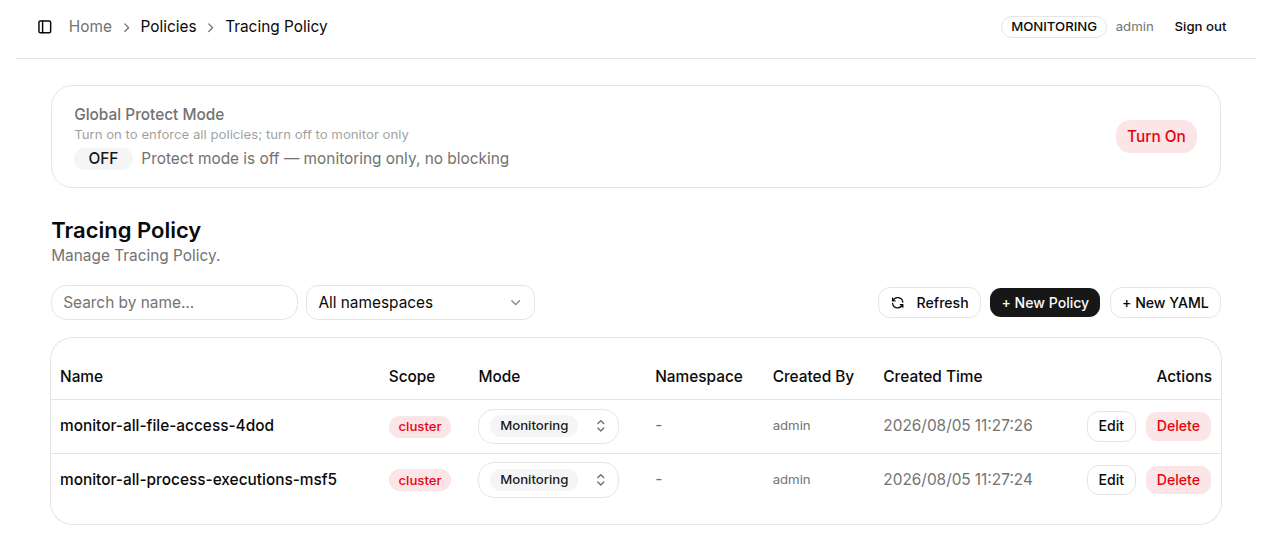
The Tetragon Agent applies the new mode within seconds - no need to open the edit page or restart any service.
Method 2: In the Create / Edit Page
When creating a new Policy or clicking "Edit" from the list, the Mode dropdown in the top-right corner of the page sets the execution mode for that Policy.
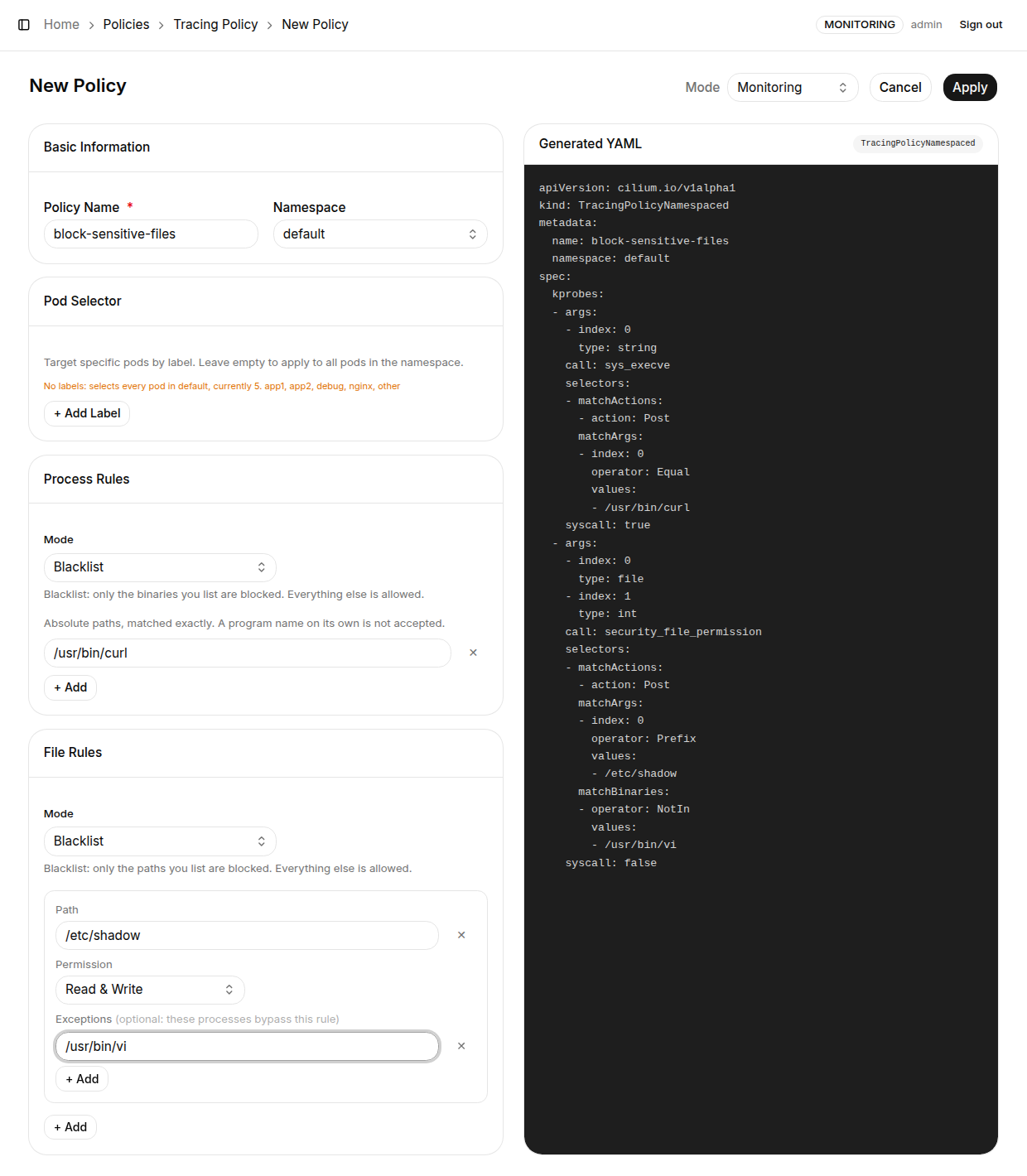
After changing the mode, click "Apply". The Tetragon Agent applies the change immediately.
Method 3: Global Protect Mode (Bulk Switch)
In addition to switching individual Policy modes one by one, K8s Sentinel provides a Global Protect Mode feature that switches all TracingPolicies in the cluster to the same execution mode with one click.
The Global Protect Mode toggle banner is located at the top of the TracingPolicy list page.

| State | Banner Text |
|---|---|
| OFF (default) | "Protect mode is off - monitoring only, no blocking" |
| ON | "Protect mode is on - all policies are enforcing" |
Enable Global Protect Mode
Action: Click the "Turn On" button on the banner.
How it works: The K8s Sentinel backend queries all TracingPolicy and TracingPolicyNamespaced resources in the cluster and batch-updates each Policy's mode field to Protect. The Tetragon Agent, upon detecting the CRD resource change event, immediately reloads the rules - no Agent restart required.
Disable Global Protect Mode
Action: Click the "Turn Off" button on the banner.
How it works: K8s Sentinel batch-reverts all TracingPolicy mode fields in the cluster to Monitoring. After the Tetragon Agent receives the update, it immediately switches back to record-only mode and stops blocking all behavior.
Before enabling Global Protect Mode, make absolutely sure all TracingPolicies in the cluster have been thoroughly validated. If a rule is incorrectly configured (e.g., a Whitelist is missing a required executable path), switching to Protect mode may block legitimate business traffic or critical services, causing service outages. We recommend validating in a test environment first, or using Method 1 to switch Policies to Protect mode one by one to confirm no issues before enabling the global switch.